Anti-cheat kaldırılırken hata: 'Service Gameguard AntiCheat service' (ggsvc) could not be stopped
Yayınlandı
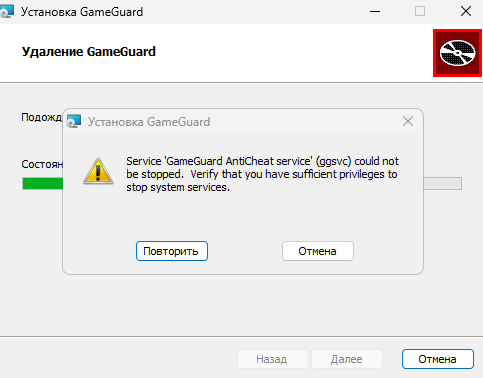
Eğer GameGuard anti-cheat'i kaldırma sürecinde, oyun projesi FASTCUP.Net üzerinde şu hatayla karşılaşırsanız: Service 'Gameguard AntiCheat service' (ggsvc) could not be stopped. Verify that you have sufficient privileges to stop system services , anti-cheat'i elle kaldırmanız gerekir:
1. Windows'u güvenli modda başlatın:
gameguard.ac/help/tr-windows-safe-mode
2. Komutları komut isteminde (cmd.exe) girin:
gameguard.ac/help/tr-how-to-open-command-prompt-windows
sc stop acdrv
sc stop ggsvc
sc delete acdrv
sc delete ggsvc
3. Normal modda yeniden başlatın ve GameGuard anti-cheat'i resmi siteden yeniden kurun: https://gameguard.ac